
Most people use their banking app to check balances and transfer money. But many customers don't realize their mobile banking app includes tools that can help them organize spending, monitor accounts, prevent fraud, and even avoid travel disruptions.
Here are four powerful features inside The Bank of Missouri mobile app that can help you bank smarter.
1. Organize your dashboard
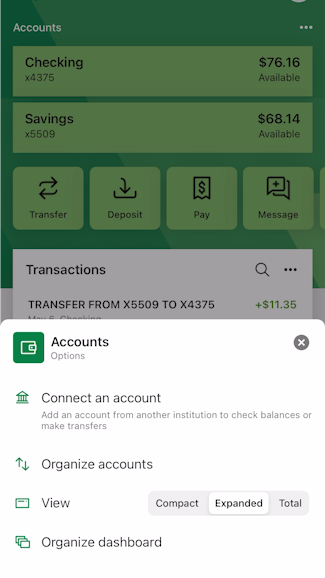
The first thing you’ll see in your Bank of Missouri app is your “dashboard.” This is a general overview of your accounts – and it’s customizable. You can organize your account view by clicking the three dots (…) near your name. Use the third option, “View,” to choose your account view to be side-by-side or stacked. You can also choose “Total” to see the total balance of all your accounts put together in one tile.
Transactions are also customizable. Underneath the account listing tiles, you’ll see a tile for “Transactions.” Again, click the three dots (…) to organize the view. Change the size to “Small” to see a very condensed view with the total number of deposits and withdrawals for all your accounts put together. Click “Large” to see every transaction for every account you have with The Bank of Missouri. Next to the date of each specific transaction, you’ll see from which account the transaction took place. You’ll also see either the last four digits of your account number, or the nickname you’ve given that account (for example, “Katie Checking”).
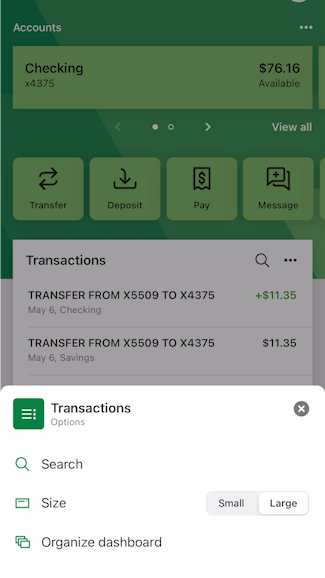
Any time you see the three dots (…) in a tile, click on them to find out how you can arrange your mobile experience to fit your preferences.
2. Track spending with transaction tags
Struggling to see where your money goes? Budget organization doesn’t come naturally to everyone. That’s why you might love our organizational feature called “Tags.” When you click on any specific transaction in your ledger, you will see the option to “Add tags.” Click it to create your own nickname, or tag, for that transaction. Whether you want to tag several items as “Business Expenses,” “Supplements,” or “School-Related Costs”—whatever you come up with—you can tag/nickname and categorize your transactions so you can more easily track your budget. This means fewer questions from your spouse on what “ABC123 SCRIPT VET” was all about. Name it something you’ll both recognize like, “Puppy Meds.”
3. Set alerts and stay on top of your accounts
Some budgeters like to know right away when a family spender makes any transaction. Others are fine with higher level review amounts. Since all budgets are not the same, you can customize your alerts, too.
To do so, within The Bank of Missouri app, click on the specific account and you’ll have an option labeled “Alerts.” You can set up alerts to be notified by in-app message, text, or email. For instance, you can ask us to text you any time your account gets below a certain dollar amount. Or you can set up alerts if anyone on your account attempts a purchase of more than a certain dollar amount.
See how to set up alerts
4. Use travel notices to avoid card disruptions
It can be very frustrating to receive an unnecessary fraud alert while on vacation. It’s even more frustrating if your card shows it was used out of state when you were comfy at home. One great way to keep your card working while you’re away from home is to let your bank know you’re traveling.
Notify us of your travel by clicking on a little airplane image to the right of “Card Management” in the app. Clicking that little airplane will prompt another screen to add a travel notice. Enter your upcoming destinations in the next screen, with dates of your trip. You can select which Bank of Missouri cards you expect to use while traveling.
It’s common for financial institutions to disable cards due to suspicion of fraud, so to help prevent any payment hiccups on your upcoming trip, go ahead and check this feature out. Giving us this head up will keep us from guarding your guard too tightly and help your funds flow smoothly for those scrumptious vacation meals.
Ready to get more from your mobile banking app? Log in today and try one of these features—or contact our team if you'd like help setting them up. We're happy to help you bank smarter and more securely. At The Bank of Missouri, we help you Live well, Bank well.